

Who owns your website after a designer builds it?
Know which rights, accounts and ongoing responsibilities come with your website, and what to agree before handover.

Paying for a website and being able to control it are different questions. A useful handover answers both: which rights and files your agreement gives you, and which accounts let you operate the site without depending on one person's login.
A small business owner should be able to identify the domain registrar, the website platform, the billing accounts and the people with administrative access. You should also know what happens if you change providers. Those answers are easier to agree before a project begins than when someone needs an urgent update and the original designer is unavailable.
There is no single ownership rule that covers every part of every website. Contracts, platform terms and third-party licences matter. The practical goal is a documented arrangement you understand, with appropriate access and a realistic exit path.
Start with an inventory, not one yes-or-no question
A website usually combines several things bought or managed in different places. Your business might control the domain, rent a hosted website platform, commission custom design, license photography and connect an email-marketing service. Calling the whole arrangement “my website” hides those distinctions.
Ask your designer to map the important parts before you sign. The map does not need passwords. It needs the account name, the business contact responsible for it, the access you will receive and any ongoing payment.
Part: Domain name; What to establish: Registered holder, registrar account, renewal contact and payment owner
Part: Platform and hosting; What to establish: Account or workspace control, administrator roles and billing
Part: Content and design; What to establish: Agreed rights, editable files and final deliverables
Part: Connected services; What to establish: Form processing, email, scheduling, analytics and payment accounts
Part: Licensed materials; What to establish: Fonts, photos, templates, plugins and any limits on reuse

Original explanatory visual by Studio FLACH. Open the image to view it at full size.
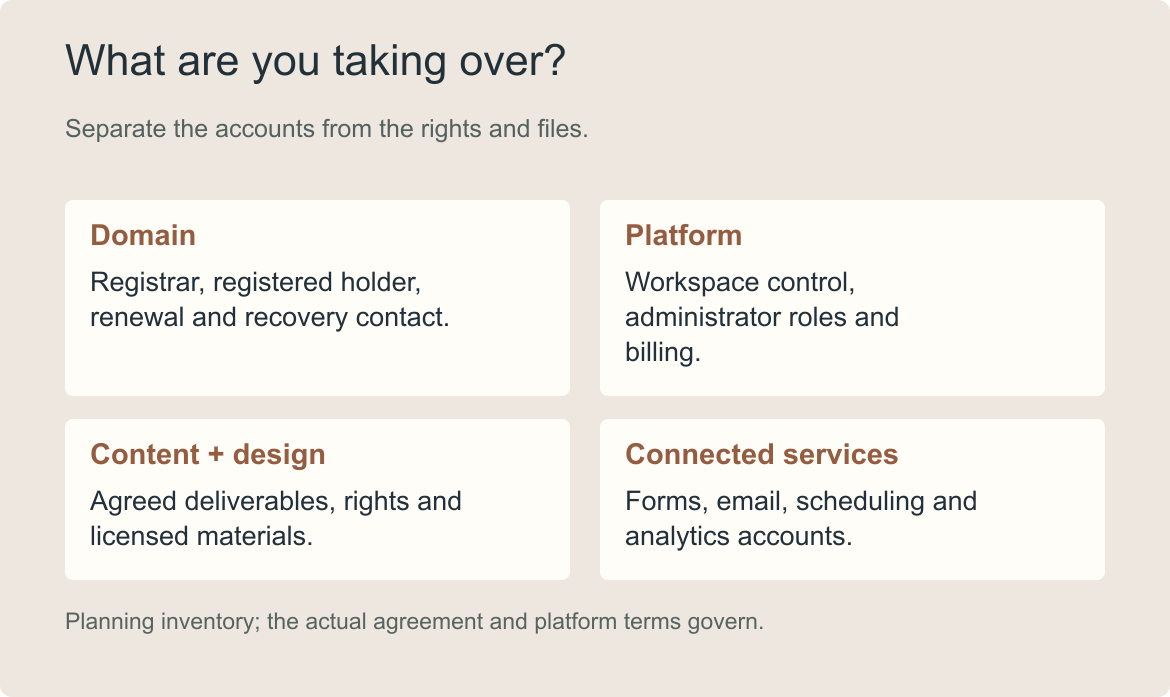
The handover inventory separates contractual rights from the accounts needed to run the site.
This is also a useful way to compare proposals. A lower project price may leave more administration with you; a higher price may include account setup, training or a managed service. Neither arrangement should be guessed from the total. Our website redesign cost guide explains why comparing responsibilities matters alongside comparing prices.
Make domain control a separate conversation
Your domain is the address people use to find the business. It may also support your email, which makes an uninformed change more disruptive than a broken homepage.
Ask who the registered holder is, where renewal notices go and who can access the registrar account. Keep the recovery method connected to the business, with a suitable backup plan. A designer can help configure a domain without becoming the only person who can renew or manage it.
Moving a domain to another registrar is not the same task as changing where the website is hosted. ICANN's transfer guidance explains that registrar transfers have conditions and may be subject to transfer locks. Check the relevant registrar's current process before treating a transfer as an instant handover step.
If email uses the same domain, ask the responsible provider to identify the records that must stay intact. Do not remove settings simply because they were added by the previous designer. Plan the change with someone who understands the existing connections.
Know where the site actually lives
Having permission to edit a paragraph is useful, but it may not give you permission to transfer the site, manage billing or invite a replacement developer. Request the access level that matches your responsibilities.
For example, Webflow's ownership guidance distinguishes a site in the agency's workspace from a site in the client's workspace. Its documentation also makes clear that billing access does not automatically grant the same control as site ownership. That is a platform-specific arrangement, not a rule for every website builder.
A hosted service can be the right choice for a small business. What matters is understanding the arrangement. If the studio manages the platform for you, establish what you can access now, how a transfer would work and what the platform allows to be moved elsewhere.
“Exportable” also needs a little explanation. Ask which elements an export contains, what would need rebuilding and whether connected functions would keep working. A folder of files is not necessarily a complete replacement for a working hosted system.

AI-generated illustrative photograph.
Illustrative generated photograph. A useful handover gives the owner practical control as well as an explanation of the arrangement.
Separate commissioned work from licensed materials
Your agreement should describe the rights to the work created for your project and when those rights take effect. It should also identify any materials supplied under a third party's licence. If the wording is unclear or the rights are commercially important, have a qualified adviser review the agreement for your circumstances.
Ask about final artwork, editable design files, website content and custom development separately. Do not assume that receiving a finished image includes the working file, or that a licence used by a studio automatically allows every future use by your business.
A stock photograph might be permitted on the website but require checking before it appears in another campaign. A font used in a design file may have separate requirements for website use. The point is not to become a licensing specialist. It is to receive enough information to avoid making future decisions blind.
A practical deliverables list can say: final logo files in agreed formats, the website in the agreed platform, a content export where available, a list of licensed components and instructions for ordinary updates. The exact list should fit the project you are buying.
A fictional handover that looks complete until one thing changes
Consider a fictional consultancy that receives its new site, a folder of images and an editor login. For a year, ordinary text changes work well. Then its administrator leaves, and the owner discovers that the form service and domain renewal both use that person's email address.
The design files were not the problem. The missing account inventory was.
Before the departure, a useful review would have checked the business's administrator access, billing and recovery contacts, the form destination and who could invite another team member. Those steps would not settle contractual ownership of every asset, but they would reveal the operational dependency.
Use this scenario to test your own arrangement: if the person who normally handles the website were unavailable next week, could someone in the business identify the right accounts and responsible providers? If not, make that the next handover task.
Agree what happens when support ends
A good working relationship can include a clear exit process. Ask what notice is required, which accounts can be transferred, what assistance is included and whether additional work would be quoted. Confirm how ongoing subscriptions are handled so an account is not cancelled before a replacement is ready.
Also distinguish access removal from data deletion. After a successful transition, the old provider's access may need changing. That does not mean immediately deleting every archive or account. Decide what to retain, what the business must keep and how the transition will be checked.

Original explanatory visual by Studio FLACH. Open the image to view it at full size.
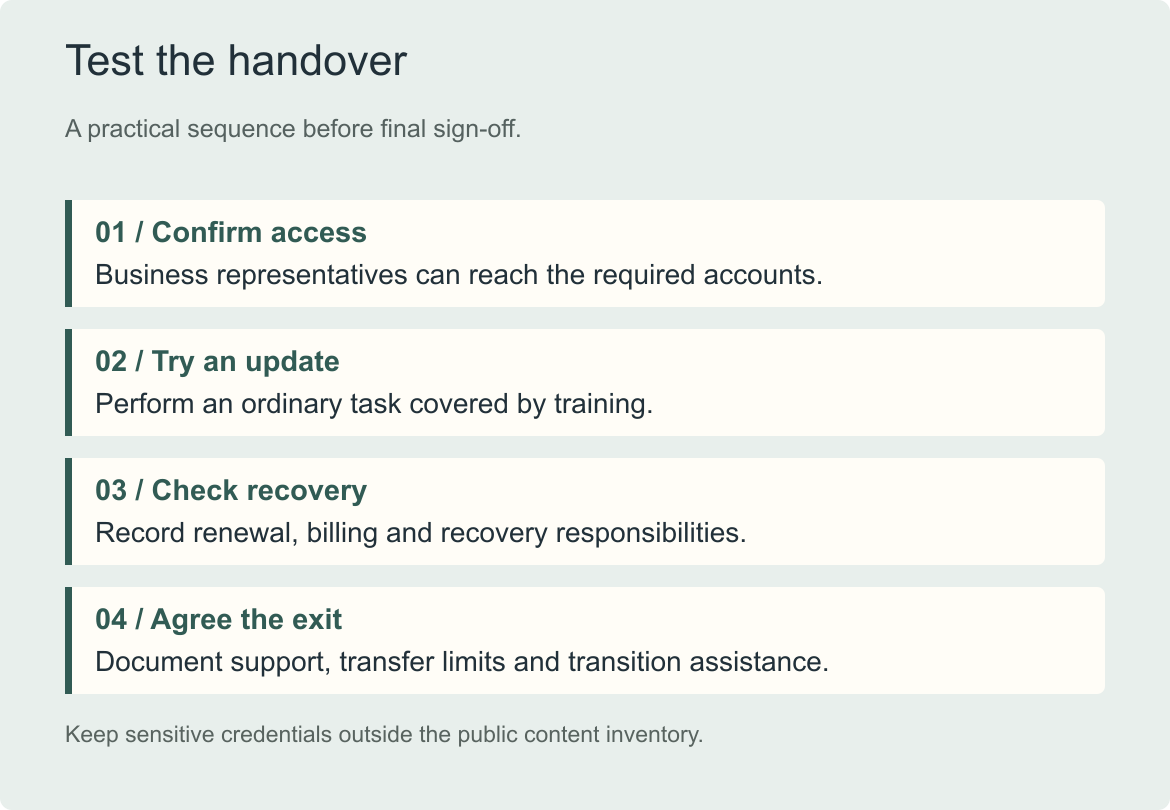
Test the arrangement before calling the handover complete. A written inventory and an observed update are more useful than an untested folder of credentials.
Ask for a demonstration before signing off
Choose an ordinary task the business expects to perform, such as editing a service description or adding a team member. Ask the studio to demonstrate it, then try it yourself in the agreed environment. Confirm where the supporting instructions are stored and who can help when a task falls outside that training.
Your final review can be short:
- Can the business reach the necessary accounts using its own authorised access?
- Are billing, renewal and recovery responsibilities recorded?
- Can someone perform the ordinary updates covered by training?
- Are deliverables, licences and any portability limits documented?
- Is the support and exit process clear?
A website you understand is easier to manage. If you are planning a new site, explore True Space and bring these questions to the first conversation. The account arrangement and handover belong in the project scope from the beginning.