

Is your contact form working? A simple enquiry-path test
Follow one authorised test message from the public page to the person responsible for replying, and record where the path succeeds or fails.

A contact form can look finished while the route behind it is incomplete. The visitor may see a success message, yet the notification goes to an old address. A message may be stored correctly in the form system but sit unseen because nobody knows to check it.
A useful test follows one clearly labelled message from the public page through to the person responsible for replying. It checks what the visitor experiences, what the receiving system records and whether your team can act on the enquiry.
Do this on a website you own or are authorised to test. Use non-sensitive test information, tell the receiving team what to expect and avoid triggering payments, appointments or unnecessary automated follow-ups. There is no need to submit test messages to other businesses to learn whether your own route works.
Find out where a submission is supposed to go
Before opening the page, identify the form's destination and the person who owns the response. Some forms store submissions in the website platform; others send information to a separate service or customer-management system. A notification email may be only one part of the arrangement.
Write down the expected result in a sentence: “A new enquiry is stored in the form dashboard, a notification reaches this inbox, and this team member replies.” If the system does something different, use that actual arrangement as your test plan.
This preparation saves time when a message is missing. You can investigate the stage that failed instead of repeatedly pressing Submit and generating more messages.
For example, Webflow's form-submission documentation distinguishes stored submissions, email notifications and custom processing arrangements. Your platform may work differently. Use its current documentation and your actual configuration rather than assuming that all contact forms share the same route.

Original explanatory visual by Studio FLACH. Open the image to view it at full size.
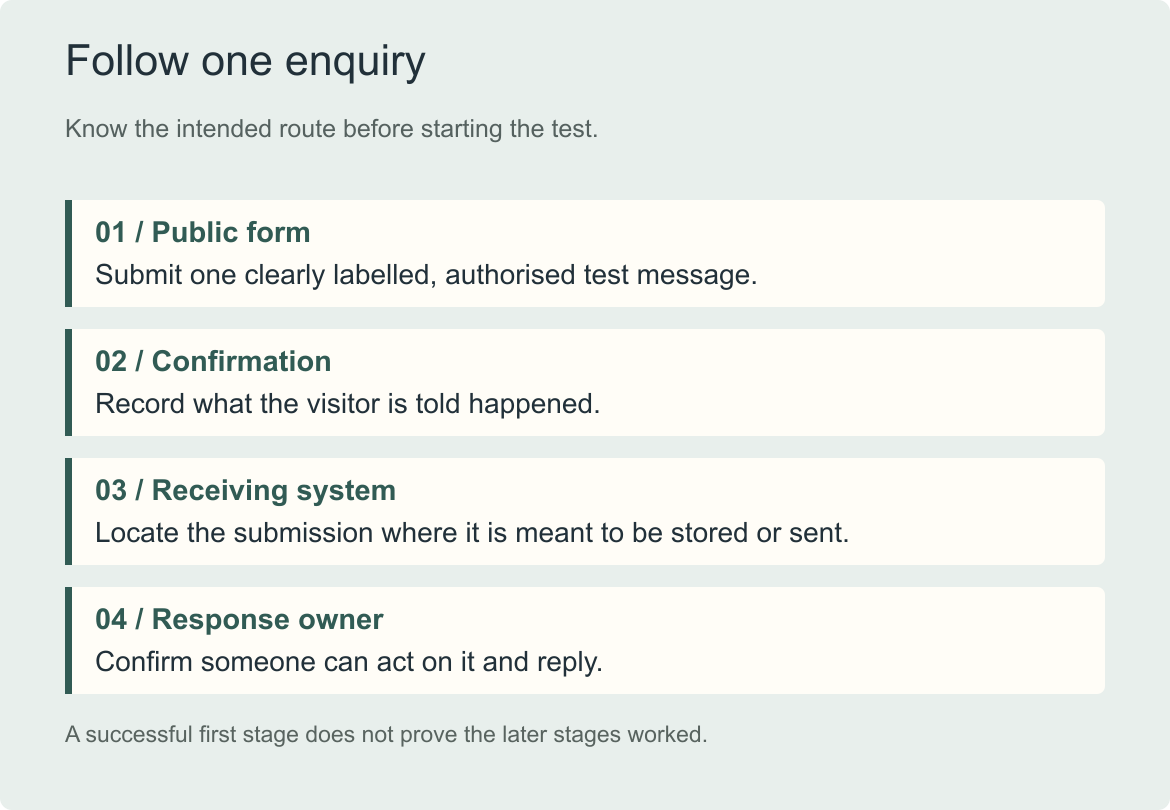
The test follows a single message across the route your business actually uses. A successful first step does not prove the later steps worked.
Start as an ordinary visitor
Open the published website through its normal address, rather than relying on a preview inside the editing system. Find the contact page from the route a prospective client would use. If several pages contain separate forms, record which one you are testing.
Read the invitation before entering anything. Is it clear what the form is for? Does the visitor know whether they are requesting information, applying for a service or booking a call? A form that works technically can still ask people to take a step they do not understand.
Check whether the requested information is proportionate to that step. A first conversation may need a name, a contact method and a little context. Requiring extensive background or sensitive documents should have a clear purpose and an appropriate collection process.
Now try the page on the device you commonly expect clients to use. Can you read the labels, reach the fields and find the button without an awkward layout? If a control is difficult to use, note the specific problem and the device rather than describing the whole page as “not mobile-friendly.”
Use one message you can trace
Give the test a unique, recognisable subject. Something such as “Website test, November 11, 10:20” is easier to find than “Hello.” Put “Authorised website test; no customer action needed” in the message itself so the receiving team knows what it is.
Use an email address you control and only the information needed to exercise the form. Where the form offers a topic or service choice, choose the route you agreed to test. Do not use a real client's information or make a fictional customer enquiry appear genuine.
If you need to check required-field validation, try leaving a required field empty once. The page should explain what needs fixing in a way the visitor can understand. Then complete the form correctly and submit the traceable message.
W3C's form-notification guidance explains the importance of clear feedback for both successful submissions and errors. A colour change or a vanished form can leave the result unclear; the visitor needs a comprehensible indication of what happened.

AI-generated illustrative photograph.
Illustrative generated photograph. The online equivalent of an acknowledgement should help a sender understand that their message has been received and what to expect next.
Read the confirmation carefully
After submitting, note the actual result. Was there a confirmation on the page? Were you taken to another page? Did an email arrive at the test address? The expected behaviour depends on the configuration, so an absent email is not automatically a fault if none was intended.
The wording should match the action. A received enquiry should not be described as a confirmed booking if a team member still needs to arrange the meeting. A promised reply time should reflect what your business can support.
Check that the confirmation does not leave the visitor at a dead end. A short explanation of the next step and an appropriate alternative contact route can be useful. Avoid encouraging repeated submissions simply because the result is ambiguous.
Record the time and the visible outcome before moving on. That small record helps a provider match your observation with the receiving system if investigation is needed.
Check the receiving side, then the reply route
Ask the authorised team member to locate the message in the intended system. Verify that the important fields arrived accurately and that the selected topic was routed correctly. A message in a dashboard may prove capture while still revealing a notification problem.
If the notification is missing, check the configured recipient and relevant spam or junk folders. Ask the website provider whether the form is using the platform's native processing or another service. Do not keep changing several settings at once; you need to know which change resolves the observed failure.
Then check how the team would reply. Does the message make the sender's address clear? If a Reply button is intended to address the visitor, does it do so? A notification sent from a system address may need a configured reply-to value. Confirm the behaviour in your particular tool.
A short reply to your own test address can verify that the receiving team can complete the route. If the form feeds a customer-management system, check the record and any assignment that the business expects. Receiving an email is not proof that every connected automation also worked.
Separate the failure from the diagnosis
Consider a fictional consulting practice whose form shows a clear success message and stores the enquiry. The owner receives no email. The team discovers that notifications still go to a former administrator.
The appropriate fix is the notification arrangement. Rebuilding the whole contact page would not address the reason this particular message was missed.
A different practice might find that its form does not capture anything after a platform change. Another might receive the message correctly but have no person assigned to respond. Those are different failures and need different actions.

Original explanatory visual by Studio FLACH. Open the image to view it at full size.
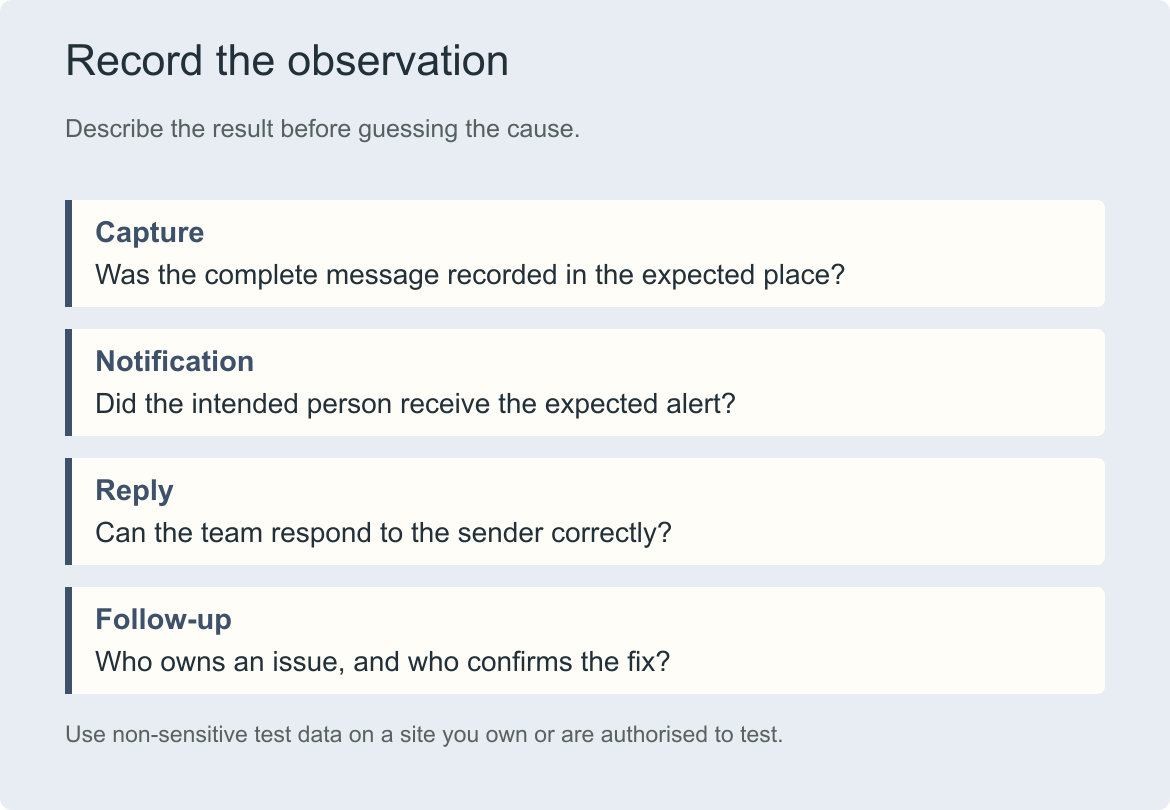
Write down what you observed before assigning a cause. “Success shown, submission stored, notification absent” gives a provider a more useful starting point than “the website is broken.”
Keep a small test record
You do not need a large technical report. A short note can contain the page address, date, device, traceable test subject, visible confirmation, receiving-system result and the person who checked it. Add the observed issue and who will resolve it.
After an authorised fix, repeat the affected route and confirm the result. If there are multiple genuinely different forms or destinations, check those paths too. One working form does not establish that every page has the same settings.
Do not disable spam protection as a routine shortcut. If a legitimate test is being blocked, ask the responsible provider to investigate the cause and the appropriate remedy. Keep ordinary protections in place while you work through the problem.
A working form is one part of the enquiry question
A successful test tells you that this submission could travel through the route at the time you checked it. It does not prove that the site has enough suitable visitors, that its offer is clear or that every future message will arrive.
If the route works but enquiries remain low, look at traffic quality, service explanations, proof and the invitation itself. Our website audit checklist helps you examine those wider questions.
True Space includes forms within the planned website work. If you are preparing a project, describe both the visitor's first step and the internal response process. The contact page is ready when the business knows how to receive and handle the conversation it invites.